

Clean-shaven bald hairstyle
All visible scalp hair is removed for the clearest preview of your natural head shape, forehead balance, and facial hair contrast.
AI Bald Filter
AI bald filter
Upload one clear portrait and use the AI bald filter to preview a clean-shaven bald hairstyle before you shave your head.
1. Upload portrait
Max 8MBUse a front-facing photo with the full hairline and head visible.
2. Compare your bald hairstyle
Your generated result will appear here
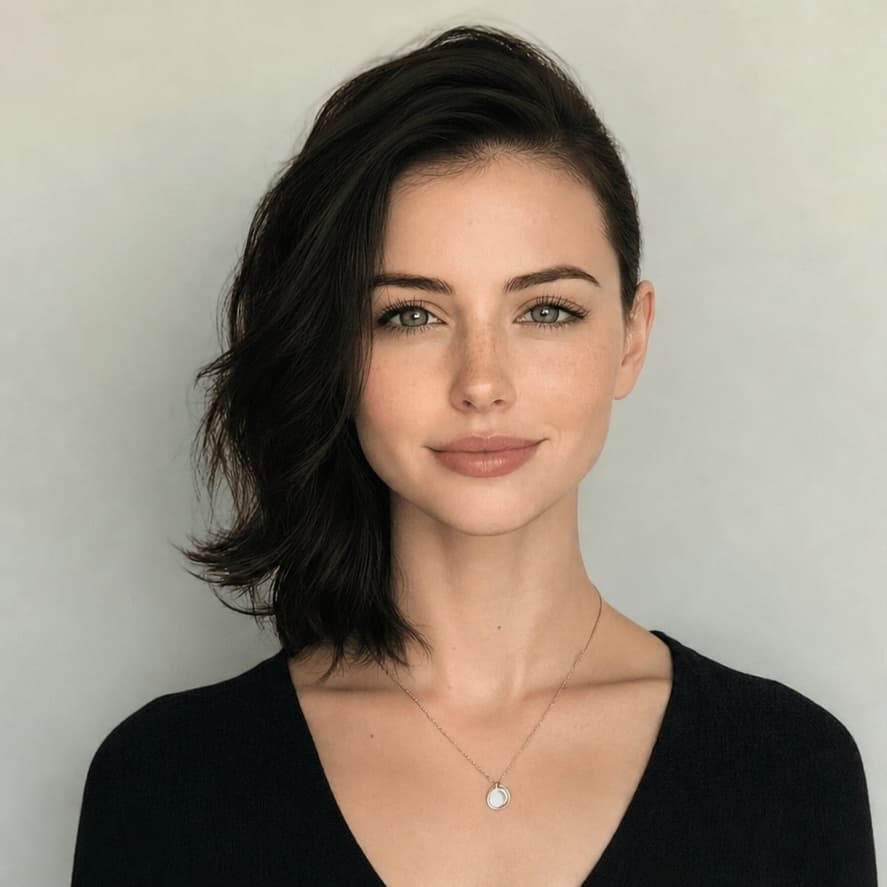
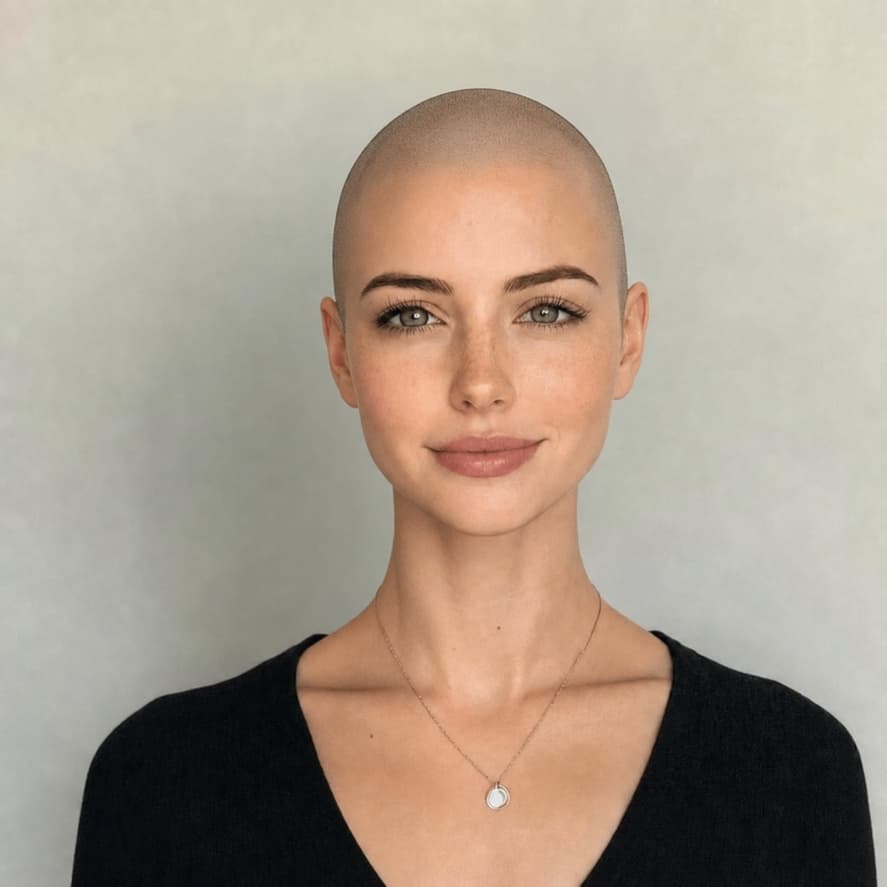
Preview before shaving
A bald hairstyle changes the balance between the forehead, cheekbones, jaw, ears, and beard. The AI bald filter gives you a personal visual reference on your own portrait instead of asking you to judge the look from someone else's photo.
Bald hairstyle guide
A bald hairstyle is a shaved or extremely close-cut look that exposes most or all of the scalp. The term can describe a clean-shaven head, a close buzz cut, or a bald fade. The best option depends on the finish you want, how often you will maintain it, and whether you plan to pair it with facial hair.
All visible scalp hair is removed for the clearest preview of your natural head shape, forehead balance, and facial hair contrast.
A uniform clipper cut leaves visible stubble and a defined hairline. It is less dramatic than a clean shave and needs frequent maintenance.
The sides blend down to bare skin while the top keeps some length. A bald fade is a barber cut, not the same as a fully shaved head.
Facial hair can add shape and visual weight around the jaw. Compare beard length and cheek lines separately from the scalp preview.
Compare bald preview options
General hairstyle apps are useful for broad haircut ideas. The AI Bald Filter is focused on one harder question: whether a clean-shaven bald hairstyle works with your own head shape, face proportions, and facial hair before you shave.
| Decision point | Our AI Bald Filter | General hairstyle apps |
|---|---|---|
| Bald-hair focus | Built specifically to remove scalp hair and reconstruct a clean bald hairstyle preview on your own portrait. | Usually built for many haircut categories, so bald previews may be mixed with buzz cuts, fades, crops, and generic edits. |
| Face and beard review | Lets you inspect how the bald look changes forehead balance, ears, jaw, beard contrast, and overall face proportions. | May show a new hairstyle idea, but often gives less attention to scalp shape, beard pairing, and shaved-head realism. |
| Before-and-after check | Uses a draggable comparison so you can review scalp outline, temple edges, and identity preservation against the original photo. | Output format varies; many tools show only a final image or a simple gallery preview. |
| Best use | Planning before shaving your head, trying a clean bald look, or deciding whether to discuss a shaved style with a barber. | Fast inspiration when you want to browse many haircuts, colors, or style directions at once. |
Three simple steps
The page uses one fixed workflow so you do not need to write a prompt or learn a photo editor.
Choose a front-facing photo with the full head, forehead, hairline, and ears inside the frame.
The fixed bald filter prompt removes scalp hair while preserving identity, facial hair, lighting, and the original scene.
Drag the before-and-after slider, inspect the scalp and temple edges, then download the preview you want to keep.
Photo quality
Hair removal requires the model to infer the scalp hidden beneath the current hairstyle. A clean, complete portrait gives it better boundaries and reduces distorted head shapes.
Keep the forehead, crown area, ears, and chin inside the photo.
Avoid hard shadows that can be mistaken for hair or an uneven scalp edge.
Hair crossing the face, neck, or shoulders is harder to remove cleanly.
Check scalp height and temple edges critically; AI output is not a physical guarantee.
FAQ
A bald hairstyle removes or clips scalp hair extremely close to the skin. It can mean a fully clean-shaven head, a very close buzz cut, or a bald fade that blends skin-short sides into slightly longer hair on top.
Upload a clear portrait and the AI bald filter edits the scalp area while asking the model to preserve your identity, expression, skin tone, facial hair, clothing, lighting, and background.
Yes. The result is a planning preview that lets you compare your original portrait with a generated clean-shaven bald hairstyle before making a real haircut decision.
Use a front-facing portrait in even light with the full forehead, hairline, ears, and top of the head visible. Avoid hats, heavy filters, cropped foreheads, strong shadows, and hair covering the face.
The generation prompt asks the AI to preserve existing facial hair while removing scalp hair. Generative edits can still vary, so review the final beard edge and sideburn area carefully.
No. It is a visual planning draft, not a guaranteed prediction. Skull shape, scalp tone, hairline shadows, camera angle, and image quality can affect the generated result.
After trying a bald hairstyle, compare it with fades, crops, buzz cuts, longer styles, and hair colors on the same portrait.